
ShotJar
Your screenshots, waiting in the menu bar. Drag any shot into any app, whenever you're ready. Search the text inside it. All on your Mac.
Every screenshot, one drag away.
Missed the five-second preview? It's in the jar. Drag any screenshot straight from your menu bar into Slack, Mail, ChatGPT, whenever you're ready.
Every feature, no account, no card·macOS 14 or later·Need another platform?
ShotJar doesn’t change how you take screenshots. It changes how you access them after.
-
Take screenshots like you always have
⌘⇧3, ⌘⇧4, or your capture tool. Nothing new to learn.
-
Every capture lands in the jar
Caught the moment it’s saved, even after the corner preview slips away.
-
Drag it out, whenever you’re ready
Click the jar (or press ⌘⇧2) and drag the shot straight into Slack, Mail, ChatGPT, anywhere.
Search by what’s inside it.
On-device OCR reads the text in every shot, English and Korean. Type “error 429” and last Tuesday’s terminal screenshot is back under your cursor.
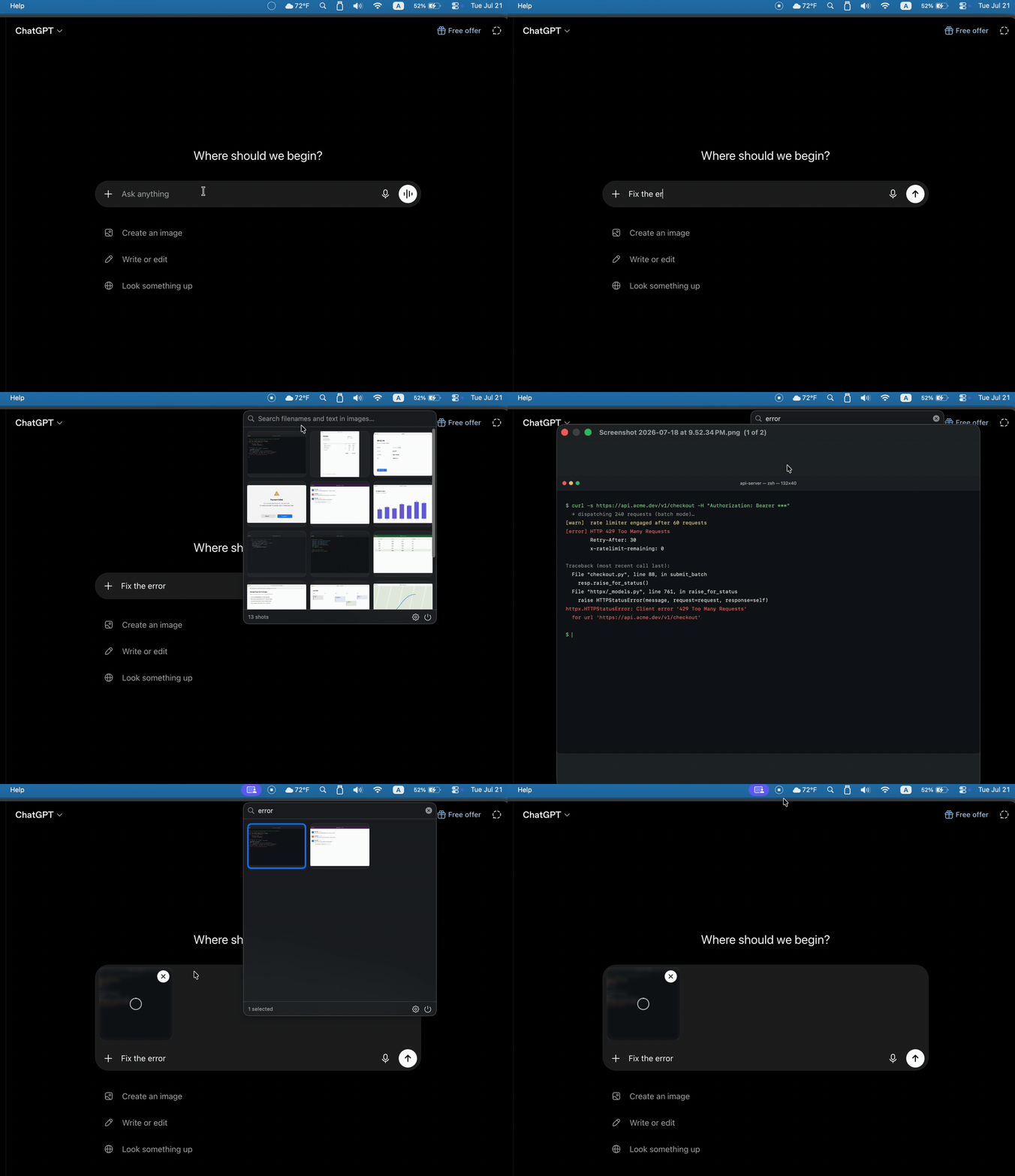
What’s in the jar.
Always in your menu bar
Every screenshot lands in the jar the moment it’s saved. No import step, no library to maintain.
Drag straight out
Every thumbnail is a live file. Drag it into Slack, Mail, or Finder in one motion.
Search inside your screenshots
On-device OCR (Apple’s Vision framework, English + Korean) finds the text inside every shot.
Multiple watched folders
Watch the Desktop, your capture tool’s folder, a project folder, and filter the jar by any of them.
Global hotkey
⌘⇧2 opens the jar from any app; esc closes it.
Private by design
OCR and search run entirely on your Mac. No cloud, no account, no telemetry.
On your Mac, and only your Mac.
None of this depends on a privacy policy. The app is built so it can’t do otherwise.
- OCR runs on-device via Apple’s Vision framework. Your screenshots are never uploaded.
- No account. Nothing to sign up for, nothing to breach.
- No cloud. There is no server.
- The network is touched for exactly two things: update checks and license validation. Verify it with Little Snitch.
One price. Once.
One license, up to 3 Macs·14-day free trial·no subscription
30-day money-back guarantee·Full pricing details
Questions.
I use CleanShot X / Shottr. Is this redundant?
No. ShotJar doesn’t capture anything. Your capture tool shoots; ShotJar is where the shots land. Add its save folder to ShotJar’s watched folders and change nothing else.
Why does it need access to my screenshot folder?
Watching that folder is the product. ShotJar reads new screenshots to show and search them — it never moves, edits, or deletes your files. macOS asks you to approve access once per folder.
Why does a screenshot take a few seconds to appear?
That pause is macOS, not ShotJar. After a capture, macOS shows a floating preview in the corner of your screen and doesn’t write the file to disk until that preview goes away — so there’s nothing for any app to see yet. Swipe the preview aside and the shot lands immediately. To skip the wait for good, press ⌘⇧5 → Options and uncheck “Show Floating Thumbnail.”
How good is the text search, really?
It’s Apple’s Vision framework — the same OCR behind Live Text. Crisp UI text, terminal output, and documents work very well; low-resolution or stylized text is harder, for any OCR. English and Korean at launch.
한국어도 되나요?
네, 스크린샷 속 한글까지 온디바이스 OCR로 검색됩니다. 앱 UI는 현재 영어로 제공됩니다.
Yes. ShotJar finds Korean text inside your screenshots, on-device. The app’s interface is currently in English.
What happens when the trial ends?
You try it with every feature unlocked. When the trial ends you'll need a license to keep using ShotJar, but your screenshots are untouched either way. They were always just files in your folders.
Your next screenshot deserves better than the Desktop.
Download ShotJar — free to tryNo account. No cloud. No subscription.·Need another platform?
Already convinced? Buy a license — $9 launch special